


Carrom Meta-Board Disc Game
4.179.00 Reviews
App Specs
- Version
- 2.39.20251121
- Updated On
- License
- Free
- Downloads
- 10,000,000+
- Developer
- Comfun
- Categories
- Sports
- Platform
- Android
Screenshots




 Analysis by AppCompare
I like the idea of a phone game that asks for a little aim and patience rather than a long tutorial or a complicated control scheme. Carrom Meta-Board Disc Game takes the familiar tabletop challenge of sending discs into pockets and turns it into a mobile sports game. If you have played carrom with family or friends, the basic appeal is obvious; if you have not, the first few turns give you a quick way to understand why lining up a shot can be more satisfying than it looks.
What to expect from a mobile carrom table
At its heart, this is a turn-based board game built around judging angles, choosing how much force to use, and making room for the next shot. That gives it a different rhythm from reflex-heavy sports games: I can pause to consider a line, but a careless move can still leave an awkward position. It suits short breaks especially well, since a match has a clear focus and does not ask me to learn a large set of controls before I can take part.
Yocheer develops the game, which sits in the sports category despite its tabletop format. It is free to install, rated for Everyone, and has reached over 10 million installs, with an average rating of 4.1 from around 111,000 ratings. Those figures suggest a broad audience, but they do not tell me whether I will enjoy each match; the deciding factor is whether I like careful shots and the occasional frustrating miss.
A first session that feels manageable
After installing it, I would start by getting comfortable with the board rather than rushing into a competitive match. The current version is 2.39.20251121, and the game requires Android 6.0 or later. Its listed release date is March 3, 2021, so this is not a brand-new experiment; it has had time to establish itself as a mobile take on a familiar game. In-app purchases range from $0.49 to $12.99 per item, so the free starting point is useful, while optional spending is something to keep in mind.
The most reassuring first step is to use the tutorial mentioned in the game’s introduction for learning the basic rules, then take a moment to understand how aiming and strength work on your screen. My practical advice is to make a few deliberate, low-risk shots before trying to show off. Focus on where the striker is going and what the other discs may do afterward. A simple pocket is a better first goal than a dramatic shot that leaves the board in a worse position.
That small change in mindset helps with the first meaningful success: pocket a disc, then notice how the remaining layout changes your next choice. I find that more useful than judging a session by whether I win immediately. If you are new to carrom, the game is easier to approach when you treat each turn as a decision about both the current shot and the setup it leaves behind.
Getting Started with Carrom Meta
First things first, downloading and setting up Carrom Meta is a breeze. Available on both Android and iOS, the app is lightweight, so it won’t hog your phone’s precious storage. Once you’ve downloaded it and opened it up, you’re welcomed with a vibrant interface that’s as inviting as your grandma’s living room on game night.
Worth Reading Before You Choose

Flipboard Shows What News Apps Must Do Beyond the Feed

Switching to Android Auto Means Rethinking Your Driving Routine

Google Calendar Makes a Crowded Week Easier to Manage

Ludo King Makes the Most of the Minutes Between Plans

Baby Panda World Brings Quick Play to Modern Phones, but Its Game Library Feels Busy

ESPN’s Live Game View Makes Following Close Games Easier
The user-friendly design makes it easy to navigate, and you’ll be playing your first game in no time. The app offers a quick tutorial that’s super helpful if you’re new to Carrom or need a refresher on the rules. Trust me, even if you’ve never played Carrom before, you’ll be flicking those discs like a pro in no time.
The Gameplay Experience
Once you dive into the game, the real fun begins. The mechanics are smooth, and the physics of the game are impressively realistic. If you’ve played Carrom on a physical board, you know how satisfying it is to pocket a disc with a perfect flick. Carrom Meta captures that feeling beautifully. The tactile response of the striker and the satisfying clink of the discs add a layer of authenticity that’s often missing in digital adaptations.
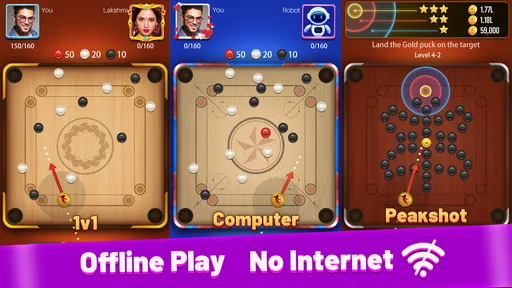
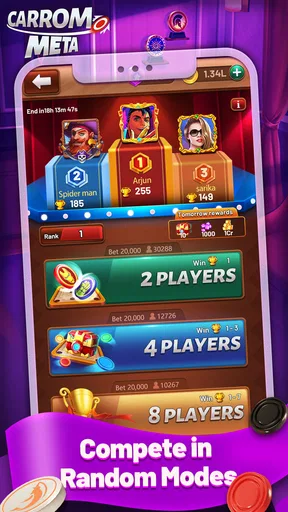
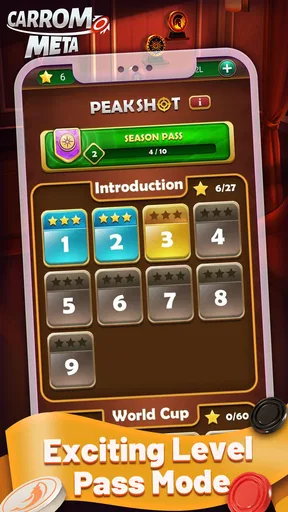
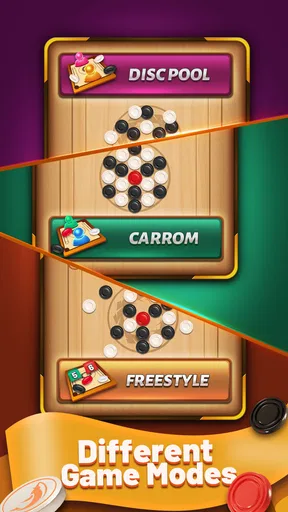
There are several modes to keep you entertained. Whether you want to challenge a friend in multiplayer mode or test your skills against AI opponents, there’s something for everyone. The multiplayer feature is particularly exciting, allowing you to play with friends or random opponents worldwide. It’s like having a global Carrom tournament right in your pocket!
Features That Shine
Carrom Meta isn’t just about the game itself; it’s packed with features that enhance the overall experience. One of my favorites is the customization options. You can choose different boards and strikers, adding a personal touch to your game. Plus, the in-game rewards and leaderboards add a competitive edge that keeps you coming back for more.
The app also offers a chat feature during multiplayer games. It’s a fun way to interact with your opponents, whether you’re engaging in some friendly banter or just saying “good game” after a match. It adds a social element that makes the experience even more enjoyable.
Choosing the right way to play
The choice between playing the AI and joining another person matters more than it may seem. I would use AI opponents when I want to practice without the social pressure of a live match, especially while learning how the striker responds to a shot. Playing a friend or a random opponent is a better test of decision-making, because the board keeps changing in response to another person’s choices. Neither is automatically the better option; it depends on whether I want a calm practice session or an unpredictable contest.
For a realistic everyday use, imagine having a few minutes before an appointment or winding down after dinner. I would open the game for a focused match, not expect it to replace a long hangout around a physical board. The mobile version’s convenience is the main advantage in that situation: there is no table to set up and no need for everyone to be in the same room. If you want the tactile feel of striking a real disc or the easy conversation that comes with sitting around a board, the physical game remains the better choice.
One useful habit is to watch the whole board after each shot, not just the disc you are trying to pocket. A shot that scores immediately can still leave an opponent with an easy next move; a defensive placement may be smarter when the direct route is poor. This is the kind of small decision that makes carrom more than a simple flicking exercise, and it gives beginners a practical way to improve without memorizing elaborate strategies.
Where the fun can snag
Online play adds variety, but it also means the experience depends on finding an opponent and on both players staying engaged. A match against someone you do not know can be less relaxed than playing with a friend, and chat may be welcome for one person but distracting for another. I would treat the social options as an extra, not as a requirement for enjoying the board itself. If you prefer a completely private, predictable game, a dedicated offline puzzle or solo board game may suit you better.
Another trade-off is that a digital board can only approximate the feel of a physical striker. The game presents a virtual version of aiming and force, so a player who expects the exact tactile feedback of a real carrom board may find the screen less satisfying. On the other hand, that abstraction is what makes a quick phone session possible. The best fit is someone who enjoys the shot-planning part enough that touch and sound are bonuses rather than the whole point.
Customization, rewards, and leaderboards can give regular players reasons to return, but they can also make a simple board game feel more competitive than a newcomer wants. I recommend learning the basic rhythm first and treating rankings as optional motivation. Since the game is free with in-app purchases, avoid buying anything just to feel ready for a first match; the useful early goal is learning the controls and making deliberate decisions, not collecting extras.
The usual alternatives in this corner of mobile gaming are other digital carrom games or unrelated casual sports titles. Compared with a broad sports game, this one is narrower and more deliberate: it is about angles and positioning rather than switching between many kinds of activity. Compared with a physical board, it wins on availability and loses some of the shared, hands-on atmosphere. That makes it a sensible pick for a carrom fan who wants a portable option, but not necessarily for someone looking for a varied sports package or a party game that brings a group together in person.
Who will enjoy it, and who may not
I would recommend giving it a try if you already like carrom, enjoy turn-based choices, or want a compact game that gives you a clear objective each turn. It can also work for a beginner who is willing to learn by taking a few imperfect shots. The tutorial and AI option make that first learning step feel less daunting, while multiplayer offers a way to put those skills to use once the basics feel comfortable.
I would skip it if your main priority is fast action, a large variety of sports, or an experience that never asks you to wait for another player. It may also be a poor match if you dislike competitive leaderboards or prefer games without optional purchases. A simple test is to play a few rounds and ask whether planning the next shot feels satisfying; if every miss just feels irritating, a more forgiving casual game will probably be a better use of your break.
Why You Should Try Carrom Meta
If you’re still on the fence about trying Carrom Meta, let me give you a nudge. This app is perfect for anyone looking to relive their childhood memories or discover a new hobby. It’s easy to pick up, yet challenging enough to keep you engaged. Plus, the ability to play with people from around the globe makes it a fantastic way to connect with others over a shared love for Carrom.
In a world filled with complex and time-consuming games, Carrom Meta offers a refreshing change. It’s casual, it’s fun, and it’s exactly what you need to unwind after a long day. So, if you haven’t already, give it a shot. Download it, play a few rounds, and let yourself get lost in the simple joy of flicking those discs across the board.
In conclusion, Carrom Meta is a gem of a game that successfully brings the traditional Carrom experience to your mobile device. Whether you’re playing solo, with friends, or against global competitors, there’s something incredibly satisfying about this app. So go ahead, download it, and start flicking!
Pros
- Smooth
- responsive controls enhance gameplay.
- Variety of game modes keeps it interesting.
- Easy to learn for beginners
- hard to master.
- Engaging graphics and sound effects.
- Multiplayer mode facilitates social interaction.
Cons
- Contains in-app purchases and ads.
- Occasional connectivity issues in multiplayer.
- Limited customization options for boards.
- Some features locked behind paywalls.
- Requires constant internet connection.
FAQs for Carrom Meta-Board Disc Game
What is Carrom Meta-Board Disc Game?
Carrom Meta-Board Disc Game is a digital adaptation of the classic tabletop game, Carrom. It offers realistic physics and engaging gameplay, allowing players to compete against AI or other players online. The app is available on both Android and iOS, providing a convenient way to enjoy Carrom anytime, anywhere.
How do you play Carrom Meta-Board Disc Game?
In Carrom Meta-Board Disc Game, players use a striker to pocket their designated discs into the corners of the board. The objective is to pocket all your discs before your opponent does. The game offers various modes including single-player, multiplayer, and challenge modes to enhance your skills.
Are there in-app purchases in Carrom Meta-Board Disc Game?
Yes, Carrom Meta-Board Disc Game includes in-app purchases. Players can buy coins and other items to customize their experience, unlock new boards, or enhance gameplay. While the game can be enjoyed for free, these purchases offer additional features and conveniences.
Does Carrom Meta-Board Disc Game require an internet connection?
Carrom Meta-Board Disc Game can be played both online and offline. Single-player modes against AI do not require an internet connection, but multiplayer modes and certain features, like leaderboards and challenges, do require you to be online.
Can I play Carrom Meta-Board Disc Game with friends?
Yes, you can play Carrom Meta-Board Disc Game with friends. The app supports multiplayer modes where you can challenge friends or compete with players globally. Simply connect with your friends through the app, and enjoy a competitive Carrom match together.


